

Compatible With:
- Oxide
Vehicle Licence Shop
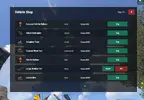
A clean, paginated buy/spawn/kill UI for the Vehicle Licence plugin.
Overview
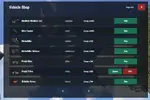
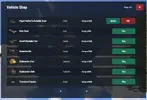
Vehicle Licence Shop gives your players a single, tidy panel to browse, purchase, and manage every vehicle they're allowed to use. No more memorizing chat commands or digging through /help — players open one menu, see each vehicle's icon, command, and price at a glance, and buy with a click. The moment a vehicle is owned, its Buy button automatically becomes Spawn and Kill, so the same panel doubles as a vehicle manager.
This is an addon for the free Vehicle Licence plugin — it adds the UI layer while Vehicle Licence handles the vehicles themselves.
Features
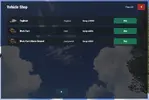
- One-panel shop — paginated list of every vehicle the player has permission for.
- Smart buttons — Buy turns into Spawn + Kill automatically once a vehicle is owned, read live from Vehicle Licence ownership data.
- Per-vehicle images — uses Rust's built-in item icons out of the box, with optional custom image URL overrides via ImageLibrary.
- Permission-aware — only displays vehicles a player can actually use; respects vehiclelicence.all and per-vehicle permissions.
- Fully configurable — rename the command, the title, every button label, items per page, and the "no vehicles" message.
- Optional access gate — restrict the shop to a dedicated permission if you want it for VIPs or specific groups.
- Lightweight — work happens only when a player opens the menu or clicks a button; nothing runs on a tick.
Requirements
- Vehicle Licence (required) — the shop stays idle until it's installed and loaded.
- ImageLibrary (optional) — only needed if you set custom vehicle image URLs.
Commands
- /vshop — opens the shop (command name is configurable).
Permissions
- vehiclelicence.use — standard Vehicle Licence permission needed to use the shop.
- vehiclelicenceshop.use — optional addon gate, only enforced if you enable it in the config.
Configuration
Everything is editable in oxide/config/VehicleLicenceShop.json — chat command, panel title, items per page, all button text, close-after-purchase behaviour, and image overrides. Full breakdown in the included README.
Support
Comes with a README and changelog. When reporting an issue, please include your Oxide version, Vehicle Licence version, and any console errors.
